The Ultimate Setup Guide for Your Z95A OLED
The arrival of the Z95A OLED marks a significant milestone for home cinema enthusiasts seeking the pinnacle of display technology. As a flagship model, it represents the culmination of advanced panel engineering and sophisticated image processing, designed to deliver a viewing experience that rivals professional mastering monitors. However, owning such a high-caliber television is only half the battle. To truly unlock the potential of its Micro Lens Array (MLA) technology and the nuanced control of its HCX Pro AI Processor MK II, a meticulous setup process is essential. This guide provides a comprehensive roadmap for transforming a standard out-of-the-box experience into a calibrated masterpiece of home entertainment.
Detailed Product Analysis: The Engineering Behind the Glow
The Z95A is not merely an incremental update; it is a showcase of what is currently possible with self-emissive display technology. At its core lies the Master OLED Ultimate panel, which utilizes Second-Generation Micro Lens Array (MLA) technology. By placing billions of microscopic lenses over the OLED pixels, the display can redirect light that would otherwise be lost internally, resulting in a dramatic increase in peak brightness. This allows the Z95A to achieve HDR highlights that were previously the sole domain of high-end LED-backlit sets, all while maintaining the perfect ink-black levels for which OLED is renowned.
Beyond the hardware, the Z95A is defined by its HCX Pro AI Processor MK II. This silicon brain is responsible for the heavy lifting of upscaling, noise reduction, and color mapping. It features a specialized "4K Remaster" engine that uses machine learning to identify specific objects within a frame—such as faces, foliage, or sky—and applies targeted enhancements. For enthusiasts, the most critical aspect of this processor is its commitment to "the filmmaker’s vision," ensuring that skin tones remain natural and that the creative intent of the director isn't lost to over-aggressive digital sharpening.
The audio system is equally ambitious. Unlike many slim televisions that require an immediate soundbar purchase, the Z95A features an integrated "360° Soundscape Pro" system tuned by Technics. This array includes front-firing, side-firing, and up-firing speakers, creating a physical Dolby Atmos height effect that is surprisingly wide and immersive. For many users in medium-sized living rooms, this built-in solution provides a level of spatial audio that makes external speakers an optional luxury rather than a necessity.
Pros and Cons of the Z95A OLED
- Class-Leading Brightness: The MLA panel achieves exceptional peak luminance, making HDR content pop even in well-lit rooms.
- Accurate Out-of-the-Box Color: Cinema and Filmmaker modes are tuned to industry standards, requiring minimal professional calibration for most users.
- Gaming Powerhouse: Supports 144Hz refresh rates, VRR, and G-Sync, coupled with a dedicated Game Mode Extreme for ultra-low latency.
- Integrated Spatial Audio: The Technics-tuned speaker array provides a genuine Atmos experience without extra clutter.
- Sophisticated Smart Interface: Improvements to the operating system provide faster navigation and deeper integration with smart home ecosystems.
- Premium Pricing: As a flagship model, the financial investment is significant compared to mid-range OLED alternatives.
- Physical Depth: Due to the advanced cooling and speaker arrays, the chassis is thicker than ultra-thin "gallery" style OLEDs.
- Weight: The sturdy build quality and integrated audio hardware make the unit considerably heavy, requiring two people for safe unboxing and mounting.
Critical Setup Steps: From Unboxing to First Light
Step 1: Physical Placement and Thermal Management
The Z95A utilizes a sophisticated heat management system to sustain its high brightness levels without risking permanent image retention (burn-in). When choosing a location, ensure the TV is not placed in direct, harsh sunlight, which can interfere with the panel's anti-reflective coating and add unnecessary thermal stress. If wall-mounting, use a high-quality VESA mount rated for the Z95A’s weight, and ensure there is at least a two-inch gap between the back of the TV and the wall to allow the side and top-firing speakers to reflect sound effectively.
Step 2: Optimizing the Visual Foundation
Once powered on, the first temptation is to leave the TV in its "Standard" or "Dynamic" mode. To get the most out of the panel, navigate immediately to the Picture Settings. For movies and high-end TV shows, Filmmaker Mode is the gold standard. It disables unnecessary motion smoothing and artificial sharpening. However, if you are viewing in a room with significant ambient light, the Dolby Vision IQ setting is a revelation; it uses the TV's built-in light sensor to dynamically adjust the HDR tone mapping based on the brightness of your environment, ensuring shadow detail isn't crushed during the day.
Shop the latest TVs & Home Theater picks on Amazon.
See Deals →Step 3: Audio Calibration with Space Tune
The Technics speaker system requires calibration to account for your room's acoustics. Use the "Space Tune" feature found in the Audio menu. This process uses the microphone in your remote to play a series of test tones. It measures how sound bounces off your walls and ceiling, then applies a custom EQ to ensure the Dolby Atmos effect is centered on your primary seating position. This step is often overlooked but provides a massive improvement in dialogue clarity and surround-sound placement.
Technical Comparison: Z95A vs. Competitive Standards
| Feature | Z95A OLED (MLA) | Standard 4K OLED | Mini-LED Flagships |
|---|---|---|---|
| Peak Brightness | Ultra-High (2000+ nits) | Moderate (700-900 nits) | High (2000-3000 nits) |
| Black Levels | Perfect Infinite Black | Perfect Infinite Black | Near-Perfect (Minor blooming) |
| Viewing Angles | Perfect | Excellent | Good (Slight color shift) |
| Gaming Refresh Rate | Up to 144Hz | Up to 120Hz | Up to 144Hz |
| Audio Integration | Integrated 360° Array | Standard Down-firing | Variable (Often requires soundbar) |
Buying Guide: Is the Z95A Right for You?
The Z95A enters a crowded market, but it occupies a specific niche for the most discerning buyers. Understanding who this TV is for will help justify the investment. Primarily, this is a television for Cinemaphiles. If your primary use case is watching 4K Blu-rays or high-bitrate streaming content, the accuracy of the HCX Pro AI MK II processor ensures you are seeing exactly what the colorist saw in the studio. The inclusion of specialized modes like Netflix Adaptive Calibrated Mode further cements its status as a movie-first display.
Secondly, the Z95A is a top-tier choice for Next-Gen Gamers. With the shift toward 144Hz PC gaming and the increasing use of Variable Refresh Rate (VRR) on consoles, the Z95A’s dedicated Game Control Board provides a transparent overlay of technical data (frame rate, HDR status, etc.) that allows for on-the-fly adjustments without exiting the game. The "RPG" and "FPS" sound modes also tune the audio to emphasize dialogue or directional footsteps, providing a competitive edge.
Finally, consider your Environment. If you have historically avoided OLED because your living room is too bright, the MLA technology in the Z95A changes the conversation. It is one of the few OLEDs that can comfortably compete with sunlight. However, if you already own a high-end sound system and a dedicated dark room, you are paying a premium for the Technics audio integration which you might not use. In that specific case, you are buying the Z95A purely for its superior panel processing and brightness.
Advanced Calibration for Enthusiasts
For those who want to go beyond the presets, the Z95A offers deep calibration tools including 10-point and even 1-point white balance adjustments. While professional calibration is recommended for perfect accuracy, hobbyists can improve their experience by focusing on "Luminance Level." For SDR (Standard Definition) content, keep this setting lower (around 30-40) to preserve the life of the panel and provide a more comfortable viewing experience at night. For HDR, leave it at its maximum to allow the MLA lenses to do their work.
Another critical setting is "Smooth Motion Drive." While purists prefer this off, a "Min" or "Custom" setting (Blur Reduction 3, Film Smooth 0) can help mitigate the "stutter" effect seen on high-speed OLED panels during slow panning shots in 24p cinema content, without creating the artificial "soap opera effect." This strikes a balance that maintains the cinematic feel while taking advantage of the panel's instantaneous response time.
Looking for the best TVs & Home Theater deals on Amazon?
Shop Amazon →Real-World Use Cases
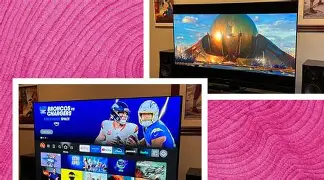
Consider the typical Sunday afternoon sports viewer. In many homes, this involves a room filled with light. The Z95A's "Auto AI" mode is particularly effective here. It can detect that sports are being shown and will automatically boost the brightness and adjust the motion handling to keep the ball or puck sharp against the grass or ice, while simultaneously using the light sensor to ensure the colors remain vibrant despite the glare on the screen. This "set it and forget it" intelligence is a major draw for households with varied viewing habits.
Conversely, a late-night session with a horror film or a space epic like Interstellar highlights the Z95A's true strength. The ability to transition from a blindingly bright star to the absolute void of space within a single pixel is the hallmark of the Master OLED Ultimate panel. In these moments, the absence of blooming—the halo effect often seen around bright objects on traditional LED TVs—justifies the flagship status of the Z95A.
Conclusion
The Z95A OLED stands as a testament to how far home display technology has progressed in the last decade. By marrying the traditional strengths of OLED—perfect blacks and infinite contrast—with the high-luminance capabilities of MLA technology, it effectively eliminates the last remaining compromises of the medium. Setting up this television is an exercise in refinement. By choosing the correct picture modes, calibrating the integrated audio to your specific room, and understanding the nuances of its powerful processing, you ensure that every dollar spent is reflected on the screen.
Whether you are a hardcore gamer looking for the lowest input lag and highest refresh rates, or a film lover seeking the most faithful reproduction of a cinematic masterpiece, the Z95A provides the tools necessary to achieve those goals. It is a sophisticated piece of equipment that rewards those who take the time to move beyond the factory defaults. Once the setup is complete, the Z95A fades into the background, leaving only a window into the content that is as bright, dark, and colorful as reality itself.